
ocenaudio是一款免费的录音和音频编辑软件,可用于音频剪辑,音频增强,音频转换和批量处理等,既适合初学者快速上手,也能满足进阶用户的基础音频处理需求。
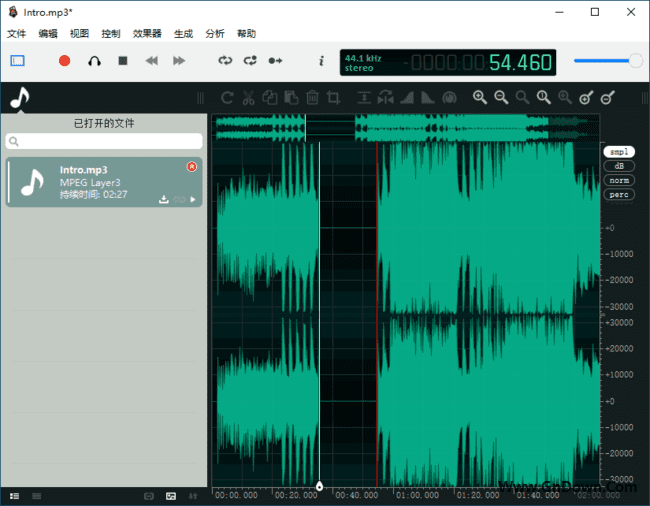
软件功能
1. 多轨道编辑:可以在同一时间轴上同时编辑多个音频轨道,方便用户进行混音和音频处理。
2. 实时效果预览:支持实时预览音频处理效果,方便用户调整音频参数和效果。
3. 音频录制:支持录制音频,可以录制计算机声音和麦克风音频,方便用户进行音频采集和录制。
4. 批量处理:支持批量处理多个音频文件,可以一次性对多个文件进行音频处理和转换。
5. 多种音频格式支持:支持多种常见的音频格式,包括MP3、WAV、OGG、FLAC、AAC等。
6. 音频编辑工具:提供多种音频编辑工具,包括剪切、复制、粘贴、淡入淡出、音量调整等。
7. 音频增强工具:提供多种音频增强工具,包括均衡器、压缩器、降噪器、混响器等。
8. 音频转换工具:支持将音频文件转换成不同的格式,方便用户在不同的平台和设备上播放和使用。
软件特点
1. 界面简洁易用:ocenaudio的界面简洁清晰,易于操作,即使是新手也可以轻松上手。
2. 多种音频处理工具:ocenaudio提供多种音频处理工具,可以满足用户不同的音频处理需求。
3. 实时效果预览:ocenaudio支持实时预览音频处理效果,方便用户调整音频参数和效果。
4. 多种音频格式支持:ocenaudio支持多种常见的音频格式,方便用户在不同的平台和设备上使用。
5. 免费软件:ocenaudio是一款免费软件,用户可以免费下载和使用,无需支付任何费用。
更新日志
ocenaudio – Version History
https://www.ocenaudio.com/changelog
Version 3.18.0
Adds option to automatically focus the waveform area when the mouse is over it
Adds format preset memory bar to the Audio Change Format dialog.
Adds a redesigned channel routing table with a modern look, paged navigation, and new editing controls
Adds Trim Left/Right actions to remove audio relative to cursor, selection or regions boundaries
Adds Split at Cursor action for quickly splitting audio at the cursor position
Adds Hard Limiter effect to Dynamics Processing
Adds linked annotation tracks with synchronized region editing
Adds embedded storage format for tracks and regions
Adds displays annotation labels directly on the audio canvas (selecting track as default)
Adds track configuration panel with font size adjustment
Adds support for track templates (create and reuse annotation track setups)
Fixes an issue where Opus export could duplicate channels, resulting in incorrect stereo output
Fixes issues with effects execution and potential Audio Unit plugin crashes
Moves the Audio Properties dialog from the View menu to the File menu
Other bug fixes and improvements
下载地址
ocenaudio(录音和音频编辑软件) v3.18.0 多语便携版
夸克云:https://pan.quark.cn/s/d26679448cd6
123 盘:https://www.123912.com/s/tPd6jv-frT9H
百度云:https://pan.baidu.com/s/1BDYqq58tivOmnd6zpmiplg?pwd=7x5i